Neighborly

How people agree to receive Neighborly texts.

1. Login screen
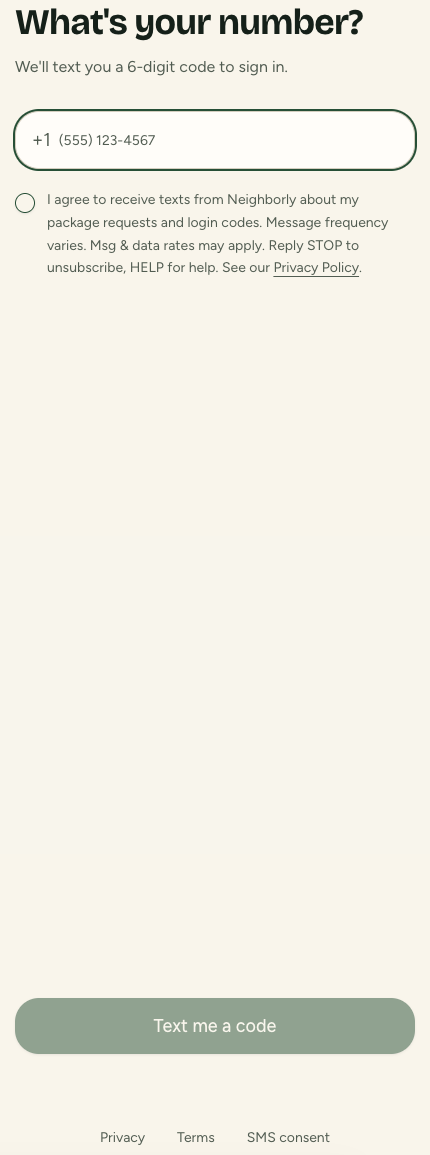
Login screen with the SMS agreement checkbox below the phone number field
Requesters check the SMS agreement box before requesting a login code, and the checked time is saved to their profile after they verify their phone number.

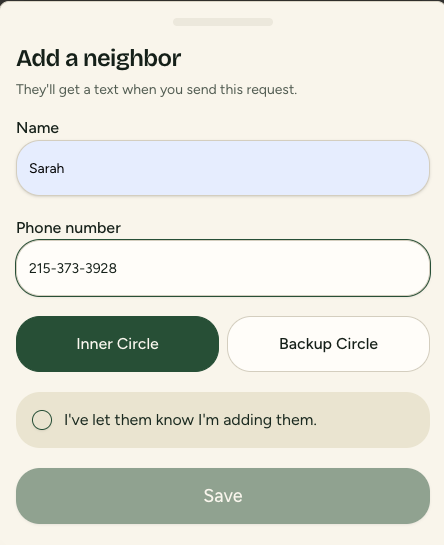
2. Add a neighbor

Add a neighbor form with the “I've let them know I'm adding them” checkbox
Before adding a neighbor, the requester must check “I've let them know I'm adding them” to confirm they have informed that person.

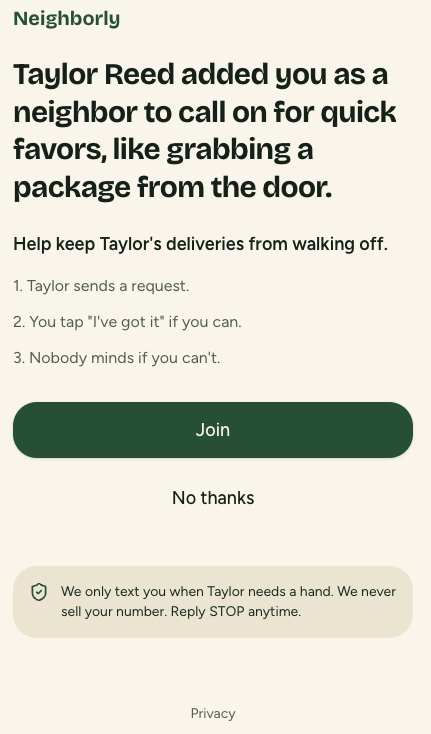
3. Neighbor Join page

Neighbor Join page with the privacy promise and STOP opt-out wording
Neighbors choose Join after seeing the privacy promise, STOP opt-out wording, message frequency, and message and data rate disclosure.

First message a neighbor receives

Neighborly: Taylor Reed added you as a neighbor to call on for quick favors, like grabbing a package. We never sell your number. Join: [link] Reply STOP to opt out.